Prairie Light eBook Series

Showing posts with label instructional design. Show all posts

Friday, January 29, 2016

Design Implications for Online Training Videos - Lessons from the field

Some time ago I wrote a tongue-in-cheek post entitled How to Monetize Your Job Interviews. It told the story of an interview I had a few years ago that took on a life of its own. This interview, which was with an instructional-design firm, required me over the course of a weekend to complete and submit instructional design plans on how to insert a drill-bit into a cordless drill. The interviewer sent me the design specifications via email. I diligently completed the required components of the design. Then (geek that I am) I added on a short video which I uploaded to YouTube (I guess as an example of leveraging existing technology and resources to reach the intended audience at any time on any platform). The video itself was very quick and dirty and also extremely short (1:06 minutes in length). I did not have a cordless drill nor did I know how to operate one; so I got my husband Ben to show me on his corded drill. The video had no sound, instead focusing on my hands and their actions Charlie-Chaplin style. I submitted my documents and the YouTube URL to my interviewers via email and waited for a reply. The position, alas, did not materialize so I continued my job search, completely forgetting about the video I'd left on YouTube - until a year or so later, that is, when I received an email notification that a viewer had commented on my video. I went to the YouTube site to read the comment and to my astonishment saw that my little video had around 16,000 hits!

To make a long story short, today the video stands at 153,745 views with 57 comments (mostly thank-you's), 183 likes, and 44 dislikes. While people seem to have definite opinions about this video, I'm still amazed that anybody has even taken the time to watch it, let alone to leave a comment or press a "like" or "dislike" button. In 2014 I monetized the video, Since then it has earned me around $260.00 in income - and counting (which won't put me in the millionaire class anytime soon, but hey, every little bit helps - especially on a retiree's income). ;)

Since I am now happily (and lazily) retired, the rigors of serious scholarship elude me; however, after reviewing these latest statistics from YouTube, I thought it would be fun to reflect on the question "Just what IS it about this video?"

I do believe there are some design implications in this little story: not only for those who provide just-in-time training for employees but also for those who compete for the attention of "on-demand" learners (e.g. for Photoshop tutorials). What in the world has made 154,000 people (and counting) choose to watch a crude video (with no sound) on how to insert a drill bit into a cordless drill?

Well, I have a few thoughts on that:
  • the video is brief- in fact you don't even have to watch all of it, you can probably get the gist in twenty-four seconds and be on your way. Not only does this brevity respect people's time, it is also great for slow-bandwidth connections. Also this video is short enough to retain most of it in memory (and even if someone needs to refresh their memory, a one-minute video is relatively painless to "rewind" and watch again).
  • the video is silent - there's no language to process and, for international audiences, no language barrier to overcome.
  • the video focuses exclusively on the hands and what they are doing - you never see a complete shot of a person or a shot of a talking head. Reflecting back on my own experience, I often find the presence of these in a video to be an annoying distraction, an unneeded "layer" that inserts itself between the learner and the business at hand.

Lately, I've been seeing a lot of what I would call little "speed videos" on Facebook. They quickly show how to do relatively simple tasks such as fold socks or prepare a recipe or create a craft or even braid hair in exotic ways. These very short videos are often well orchestrated and thought out - they look professional and they get tens of thousands of hits on Facebook. Additionally, they share the following characteristics: the camera focuses exclusively on a close-up on the hands and what they are doing; not only are the videos mostly under a minute in length, they take advantage of video technology's ability to time-lapse and to speed up; no one speaks in these videos although many  of them provide background music; printed language processing is held to a minimum with an occasional caption or arrow super-imposed in a strategic position; and animation is used to varying degrees. You could say they sometimes use media within media. These little videos are reminiscent of the silent movie techniques used in the 1920's. Like other viewers, I find myself willingly watching and re-watching these videos to try out "what-ever-it-is." They are fun to watch and intrinsically motivating. Following are some examples of how these videos are done:

How to Make Apple-Pie Cookies (by Tip-Hero)

length: 1:04 minutes


Some of the design choices in Tip-Hero's video below can be effective in "talking" videos that teach more complex tasks. Following the recommendations from a graphics-design class that I took at our community college a few years ago, I find myself often searching for tutorials on how to do stuff in Photoshop. While I prefer good illustrated, text-based tutorials to slow-streaming and often meandering videos, I will watch video-based instruction that is short (around seven minutes in length), easy to follow, and well thought out. An excellent example is Marty at Blue Lightening TV. His videos focus exclusively on the computer screen. They are extremely succinct; every single action on the screen is purposeful and intentional. To aid the viewer in following along with his voice, he strategically super-imposes captions and animation such as circling or underlining. Often his videos are time-lapsed and speeded up in certain sections; even though his videos are short, he thoughtfully includes more helpful information than many longer ones I've watched! I just love his work! Here's a example of one of his short tutorials:

The Best Way to Colorize a Black and White Photo

length: 7 minutes


Recently I have even seen some of these concepts extended to (short) online newscasts! Check out this video on the current presidential campaign from Aljazeera America's online channel AJ+. Interesting multimedia reporting techniques - a mix of media within media!

Does the DNC Hate Bernie?

length: 3:05 minutes


As far as training and informational videos there are techniques and then there are techniques. We could learn a lot from the little "speed videos" above. Although they are deceptively short and to the point, a lot of work and thoughtfulness has been put into their preparation. They are respectful of people's time; they are fun to watch; and they are extremely easy to understand and follow. Speaking from my own anecdotal experience only, I judge them to be extremely effective. And if I'm "late to the party" with this post, then I'd just like to contribute this testimonial to the growing body of evidence. ;)

JuneBug

A few more examples of speed videos from Facebook:


Monday, March 02, 2015

And a Television Series Called PREY


Back seventeen years ago when I was 47 years old, a TV series named PREY came along and it changed my life.

That may sound like a rather odd statement for a supposedly mature human being to make, but it also happens to be true.

It all started innocently enough...

Saturday, November 29, 2014

Introducing My "Scrappy" Photography Site

Greetings!  I am a semi-retired programmer/analyst and instructional designer who loves to dabble in photography and poetry and of late, scrapbooking - both paper-based and digital. For many years my husband Benny had a furniture refinishing business called Second Looks (http://www.secondlooks.biz) and I put up a photography site http://www.photography.secondlooks.biz to complement his business site by offering free wall-paper.

Doctors, Lawyers, and Indian Chiefs


So today it finally occurred to me that since I started this blog around 2006 in part to talk about my interest in scrap-booking and photography, I should introduce my photography site on this blog -sometimes it takes me a while to see the obvious!

But first a little about my photographic journey.

Friday, October 31, 2014

How to Monetize Your Job Interviews ;)

I started this blog back in 2005-2006 to share and swap ideas about the job hunt and work life, among other topics, but I rarely post on job-related topics these days (actually I rarely post at all these days, but when I do, it's not about work). This is probably because I'm now officially retired. That doesn't mean that I won't need to supplement my retirement income at some point in these tough economic times. I have worked alongside many a retiree in my career who decided to return to the workplace. But for now ... I'm just retired and enjoying it. I particularly don't miss the angst of the job hunt and the interview process because I tired of the some of the "nonsense" and even hypocrisy of it. But that's probably a topic for another post, which may or may never get written.  So am I the only one who finds interviewing and job hunting frustrating? Probably not. For those of you who may feel similarly, take heart or at least have a chuckle at this little anecdote about a job interview I had in back in 2009 that has taken on a life of its own.

Thursday, October 30, 2014

How to Bring Out the Story in your Casual Photos with Photoshop Filters

I've been wanting to attempt an article for the scrap-booker or casual photographer (folks like me, in other words) to share how I get the most story-telling "bang" out of my casual photos. If, on your quest toward becoming the expert photographer who always takes the perfect picture, you're like me and can't afford really high-end camera equipment with larger sensors, or if you just don't quite have the on-the-spot photography skills to meet the demands of every memorable moment you encounter, you may end up with a lot of bad, so-so average, and merely "okay" photos. (I'm not saying, by the way, that becoming a better photographer is a bad ambition). In fact sometimes even your really good photos may not quite reflect the image you stored in your mind's eye when you pressed that camera button; and if you're like me, you're always seeking ways to make your photos look even better. But good, bad, or ugly, the photos you've already taken are your reminders of the memorable events or scenes of beauty from your life. They're too good to throw away, yet somehow they remain pale, distant cousins of the actual experience - and you desperately want to breathe life back into them. So what I want to discuss in this article are ways I've found in Photoshop CS5 to change my so-so images into the image I hoped I would get when I pressed the button on the camera. These techniques may also apply to Photoshop Elements and Light Room.

Wednesday, December 29, 2010

Moving on to Illustrator

Changing over from Photoshop to Illustrator in my computer graphics class midway through the semester was a bit of an adjustment for me. I had just come off the cookbook exercises and the poster ad project, both of which had been very immersive experiences with Photoshop. The abruptness of the switch coupled with the fact that my online technical writing course started October 19 and ran through December 19 kind of cramped my style or at least stalled my momentum in my graphics class. When I started Illustrator, I guess I felt like a fish out of water. I was lost for a while even though I was not unfamiliar with vector graphics. In fact I had used vector graphics tools before I had used raster graphic tools in my computer career. In the late 80's through the 90's I used MacDraw and Word and Excel Drawing tools to do charts and system documentation. I knew about grouping and rotating and drawing shapes. Only when digital cameras came along and I started "developing" my photos in Photoshop (and more recently in Lightroom) - did I develop basic familiarity with bitmap graphics tools - and then only to develop photos.

So, even though I'd used (sometimes intensely) basic vector graphic tools first, I found Illustrator to be challenging. Of course it helped that some of the commands from Photoshop carried over to Illustrator. Two of our projects in Illustrator were to design a super-hero logo and a cd jacket for a band of our choice. I chose Sailor Moon as my super hero and combined two images to make it look like she was sitting on a moon (sort of like Betty Boop actually).


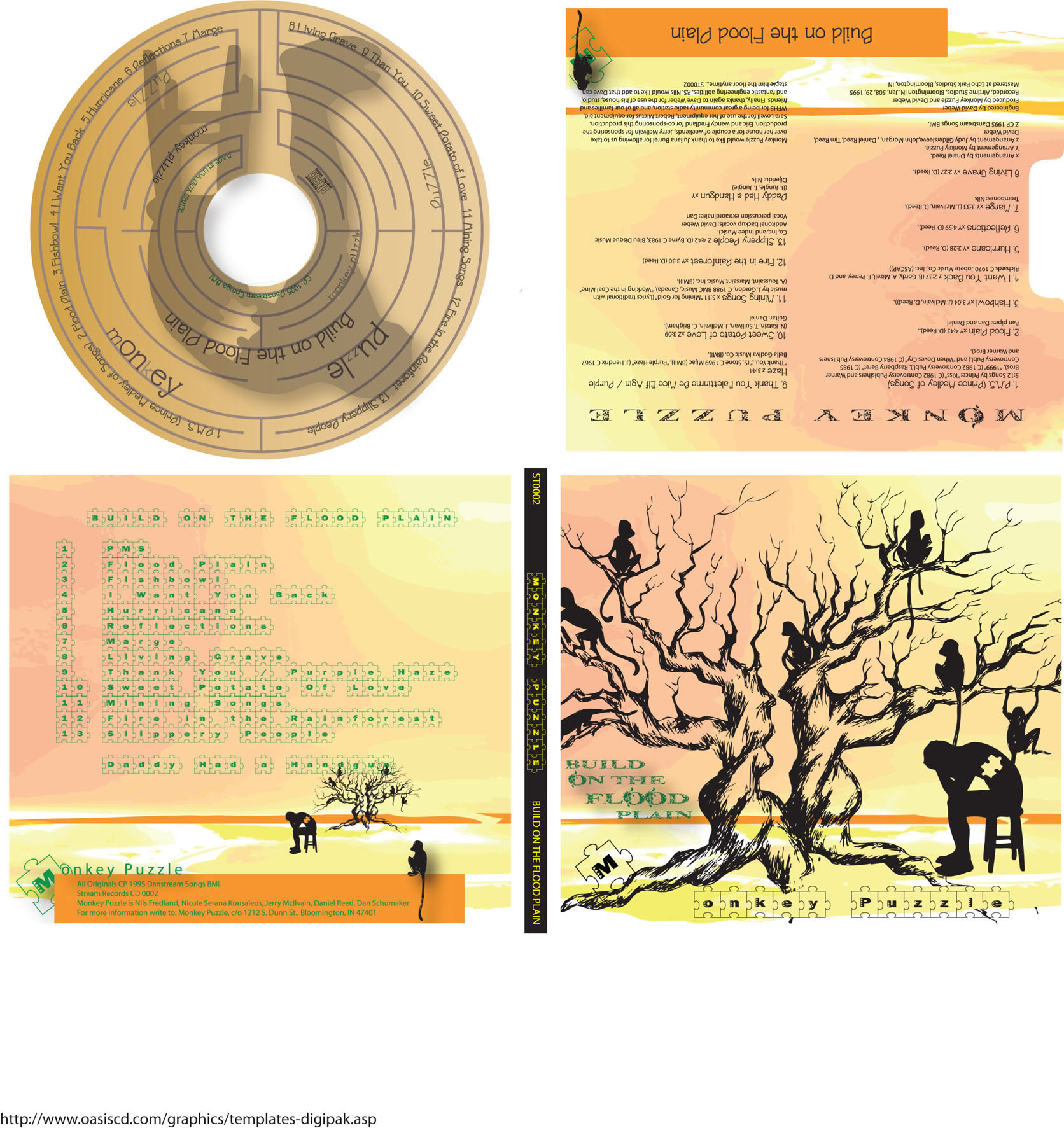
For my band, I chose Monkey Puzzle, a postmodern "rockapella" type group out of Bloomington, Indiana. I had heard them perform as the lead-in group for another singer at Lafayette's Long Center in the 90's. I don't know if they are still actively performing, but at the time I was so impressed, I bought both their CD's on the spot.

The CD cover project in particular was an excellent project to challenge me and help me to focus. I had to do a lot of research to find images and inspirations that fell within my ability to actually do something with them in Illustrator. Unfortunately, the approach suggested by our instructor - that of coming up with two drawings at the start - just didn't work for me. That was too top down - at least for this assignment. Instead I needed to search for bits and pieces, and try different things with them, and in the end was fortunate to put something together that worked. My instructor offered lots of helpful guidance to get my muse going. I also pulled the group's CDs out of my library and listened to all their music. I think that helped.

In the end, here's what I came up with:


I have to give credit to 6 wonderful resources I found on the web which served as my inspirations:

Also, apologies to Monkey Puzzle for changing the name of their CD to one of my favorite songs on it.

Reflecting back on the semester, I am still struck by the strong psychomotor component involved in learning how to use Photoshop and Illustrator. Never has that been so apparent in my other computer classes - but then again, while art and programming both involve design, the root of art lies in actually being able to take a pen, pencil, brush, or some artistic tool and render something amazing. So why should that be any different just because the process now takes place on a computer?

JuneBug

Reflections of a Senior Learner - IT Job Outlook

This past semester I had a wonderful opportunity to take an online course in technical writing through our local community college where seniors can attend for free after they turn 60. The course was an 8 week course - offered through the English department for full credit. It started October 19 and ended December 19, and so was extremely fast-paced. Our final project was to research and write a formal technical report on the job outlook in our field to other career consultants in our imaginary firm. The fields varied among the students taking the class. Some were majoring in business administration, others in the medical field, and so forth. I am a dual career person with training and experience in both the fields of information technology and instructional design (education), so I chose to write about the job outlook in information technology.


I have to say that this was an excellent assignment - I really learned a lot about online resources for this topic, if nothing else - such as the Bureau of Labor Statistic's Occupational Handbook and its accompanying O*Net website. It was also interesting and kind of fun to get to "triangulate" my own perspective on the information technology field with all its transformations and permutations over the past thirty years.


I invite you to peruse my report: Occupational Outlook for the Information Technology Field: An Informational Report for Career ConsultantsIt defines the field and lists various occupations under its umbrella as well as common duties, functions, and activities. It briefly discusses educational requirements for various occupations in the field as well as occupational outlook, placement opportunities, and personality fit. It also includes some crystal-ball type predictions on new opportunities coming down the pike. Finally the references and appendix at the end offer some nice resources to researchers and job-seekers alike. 


JuneBug


Tuesday, December 28, 2010

Reflections of an senior learner - A Blackboard Organizer

For the last 6 months I have been a senior learner - at age 60 I went back to college while unemployed to catch up on changes in my field and to get certified. Since then I have thrilled on these pages about the joys of learning and groaned and moaned about the challenges. But now the semester is through, we are almost past the holidays, and I am taking the opportunity to put my money where my mouth is. One of our projects in my online Technical Writing Course was to write a set of instructions to accompany a new product of our own invention for the company of our choice. Borrowing from lessons learned in simplifying whilst designing the Report Tickler System at Bauer Family Resources (where I served as Grants and Compliance Specialist), I imagined an enhancement to the Blackboard product used in distance learning by many institutions. Essentially my enhancement was an interactive student organizer that would take the place of all the different course syllabuses. It would help students and teachers keep track of courses, assignments, projects, and exams all in one place. In short, it attempts to address one of those pesky and persistent human problems that I imagined technology was meant to solve.

So without further ado, here are links to my imaginary Blackboard Organizer (and prerequisite cover letter):

Blackboard Student Organizer Instructions
Memo to Ray Henderson, Blackboard Inc.

JuneBug

Friday, December 10, 2010

Reflections of an Adult Learner - Learning from Final Presentations

In my Visual Basic Class we had our choice of a gradebook as a final project - either as a database exercise or as a sequential file exercise, but using advanced controls. We had the options of adding enhancements for extra credit. So I tried to do a blended "animal" between the two assignments, something that would give me experience with the best of both. And it was a good exercise. I came up with a fairly decent design and working program. But oh how I learned from my classmates the day we did our final project presentations.

I often get compliments from my instructors. Some have even commented that they wish all students put forth the effort they see me putting forth. But when I hear this, I think, "Well it kinda all depends on where each student is in life ..."

A senior learner vs a young learner - since I went to college at both stages of life (and points in between) I can make the comparison firsthand.

Recently I was chatting in the cafeteria with my friend who had told me about the community college's Senior Scholar Program. She was recounting with relish the unknown role of women in the French Revolution, the topic of a research paper for her history class. She and I often share our journey ... What's different about this stage of life, we decided, is that we are able to be more focussed (oddly) about our education. That's because we have fewer distractions (again oddly). When you go away to college out of high school, your whole life tends to be about education and being a student. But the difference is that so much of life is unknown at that age, whereas at 60 so much of life has been lived. We know who we are, we know who we've been, we know, more or less, what we want, we have ideas about how to get there, and we have a lifetime perspective. We also have our challenges - like being unemployed and bumping up against the specter of age discrimination in our job hunt. We have aging health issues - like arthritis and bifocals. We tend to want to integrate new learning into our life experiences - which slows the learning process for us. The shelves of our memory tend to get a bit overcrowded, and sometimes things fall off. But we aren't trying to go to school, work full time, and raise a family (usually). That enables us to look at the educational process with a whole new eye and to see things about it we never saw when we were younger - things such as learning is a joy and a privilege, however traditional learning processes and institutions aren't necessarily laid out to optimize that aspect ... even though they still get the job done.

But I digress - back to the vb class final project presentations. I chose the database project out of curiosity and practicality. And I more or less stuck with the design suggested by the textbook exercises - which was pretty much having everything on one form but greatly simplifying the design for the user (uncluttering it). As a result of making that choice, I ran into many more challenges than if I had given each function or option its own screen. This was a fact I didn't realize until the final presentations. My solution was probably okay as an academic exercise. But as a viable solution that gives the best product to the user and requires less bending over backwards to make it work (which would make an employer happy), it comes in second to that of my very original thinking classmate. She came up with a nicely designed and friendly vertical screen. It had a greeting and a neat column of five buttons. Each popped up a screen for that function. So simple for the user. And less complicated for the programmer, although I'm sure that design also presented challenges.

Then my other classmate, a c++ programmer, showed me something I always wanted to be possible since the inception of databases as I knew them - back in the dBASE days.

He went through it pretty fast, so I'm going to write what I think I saw. He popped up a screen in VB 2010 that had two datagrids - a parent table and a child table. I believe if he added a student to the child table, the application created a record in the parent table - to maintain referential integrity. This worked both from Visual Basic and in Access 2010 itself. All without programming the first line of code, for the most part. Simply by setting the relationship and letting it do the work for you...

All in all our day of final presentations was a real eye-opener!

JuneBug

JuneBug's Final Project Presentation

Sunday, November 21, 2010

Eating My Words - Reflections of an Adult Learner

Okay, the grumpy old fa - er, I mean, learner, has to eat her words - kudos to the Technical Writing Class's section on preparing job materials! It is the best and most comprehensive I've encountered so far. The text, the thoughtful discussion questions, along with the supplemental videos did an excellent job of preparing me for my interview on Friday!

JuneBug

http://www.youtube.com/watch?v=-zIQruPEDmg
http://www.youtube.com/watch?v=opYjNr_4A5k

Tuesday, November 09, 2010

Reflections of a Grumpy Old Far - er, I mean Learner

One thing I remember about my elders, as I was growing up, is that they had both good days and bad. Some days they woke up feeling chipper as a robin in spring. Other days they felt slow. They complained of being bothered by arthritis and various aches and pains. Well, now, I'm 60 myself, and I can appreciate the truth of certain of those stereotypes. For instance, maybe I am getting Grumpy, but like Andy Rooney of 60 minutes, certain things really irritate the hell out of me. So be forewarned. This post is not only grumpy, it's downright grouchy. Furthermore, it comes out in fragments, incomplete sentences, and and probably breaks every convention of English (or, in certain cases, programming)  that we are not supposed to violate.

I'm taking a graphics class - we are supposed to go out on the web and find tutorials. We're supposed to avoid youtube.
Grumble #1: Teacher, get over it - everybody is going to eventually use that venue, professionals and amateurs alike, just like Wikipedia, Facebook, texting on their cell phones, and whatever else new comes down the pike.
Granted students need to distinguish between professional tutorials and amateurish ones, especially those that may not teach the best approaches. But it strikes me that at this particular stage of our learning, the ability to differentiate online tutorials is not our primary job. We're just trying to learn Photoshop and Illustrator.

Wednesday, October 20, 2010

Other Lessons learned . . . Reflections of an Adult Learner

Yesterday, I lost my kitty Smokey. A blue-gray cat, with one eye just slightly larger than the other, he was just a starving little kitten when he appeared in our barn and garage last winter. I caught him and brought him into the house to tame him and feed him kitten formula so that he would be healthy and survive, and later took him to the vet for shots. It was still dark when I pulled out of our driveway in the early morning fog and saw something obviously not alive lying in the busy road and realized it was him. I was sad. On my way to take a scheduled all morning Work Keys exam at our local Work One Office, I couldn't stop. So I got out my cell to call Benny who was still sleeping, to let him know and to get Smokey off the road. When I got home much later that day, I covered him with pine needles, leaves, and all the flowers and herbs I could pick from my fall garden. Smokey was a pure ray of sunshine and a source of unmitigated love and devotion in this old world. He grew to be a healthy, happy kitty who enjoyed his home and left his people with fond memories of many sweet and funny encounters in his short tenure on earth. I don't think I've cried for ten years, but losing that little guy was truly something to cry for.

Yesterday was a day for paying attention. I took the entire Work Keys exam - again, because it had been five years since I took the last one. Several others just took sections. The proctor graded their sections during the break. One young lady was exhilarated when she learned she'd passed the Locating Information Section - the last requirement she had to fulfill. We all congratulated her, and she wished us all well as we went in to take the last portion of the exam and she got into her car to leave.

After the exam, I went to the McDonald's by Walmart on 26. A delivery guy from Jimmy John's had passed out free sandwiches to everyone at Work One during one of the breaks, so I just got a drink and salad to go along with it. Oh, yes, and cookies. What can I say - taking exams makes me hungry. At 1p I attended a Hub session at Work One - the Hub is part of a program called the Aging Workforce designed to assist displaced older workers primarily.

Next at Ivy Tech, I made a quick restroom stop before my 3p Visual Basic class. Another young woman was on her cell phone with a local childcare agency. She sounded desperate. When she learned that funding had come through, she almost broke into tears of joy. She proclaimed her good news and threw her arms around someone else she evidently knew who happened to be in the restroom. Of course we congratulated her too.

While we were waiting for the instructor to arrive to unlock the computer lab door, two of my classmates were talking, and one mentioned their sitter had gotten licensed and just doubled her fees. I told them about the girl in the restroom. My classmate said they had been on that waiting list for the last year and a half. Boy, I replied, wouldn't it be nice if Ivy Tech had a nursery school where students could just drop off their children, when they had no other childcare resources. My classmate said he'd had to to miss classes in the past when his childcare resource was unavailable or unreliable. He said it would be nice if they offered full time childcare and just added the charge to the rest of the student fees!

A childcare facility would be a great endowment project for some future benefactor of Ivy Tech to take on.

In class, we got down to business, which involved some group work. Another classmate, a quiet young man whom I'd been sitting next to for going on two months now, mentioned that he was tired today, kind of as an apology. We had never really talked much. Today he told me he'd gotten up early - about 4 a to go to work before class. Upon further discussion about our situations, I found out that he works 60 hours a week and goes to school. On top of that, since he is Spanish, he had to learn English and translate all his courses when he first started taking classes two years ago! I'd never really thought about that with programming languages. I said, "Gee, there ought to be a Spanish version of Visual Basic." He also has two children - he laughed when he opened his text and discovered his little girl had stuck stickers all over one of the pages of exercises for him.

This seems to be the week for getting back in touch. I'm going to attend an installation into Phi Theta Kappa for an older friend this evening, and most of my Thursday evenings have been spent at the Democrat Headquarters downtown, calling prospective voters encouraging them to turn out to vote November 2nd. Geez. Since I'm doing all that, I'd better not forget to turn out and vote myself, had I?

JuneBug

Smokey and Bon

Friday, October 15, 2010

Wouldn't it be cool .... Reflections of an Adult Learner

I'm taking classes at the undergraduate level (even tho I have a masters) in order to update some of my experience with newer technology and to earn certifications - and for fun, and to learn things I've always wanted to but never really had opportunity at work. I am an adult learner. My masters degree is in educational technology with a concentration in instructional design and my teaching philosophy is of the constructivist persuasion. (I also have an associate's degree in computer programming technology - 1991,  and a bachelor's in speech education - 1972.) Most of my work life has been spent in the technology field.

So far, I am four classes deep into my plan. I took a class in Excel 2007 this summer, and earned my MOS certification, and a Programming Logic class, as a review to get my feet wet with going back to school at age 60. This fall I am taking two courses, Visual Basic 2008 and Computer Graphics. And I was just thinking, wouldn't it be cool, if every time a student walked into a classroom, one of the walls was a visual map of where they had been so far (in the particular class) and where they were going. And if they helped build it. The map would represent our collective understanding as a class, and remind us that we were each in process of building a similar map in our individual minds. And we could have opportunities in class to discuss our journey with one another.

And wouldn't it be cool, if at least for an hour, we could be involved in a totally immersive process - however minute - so that at the end we emerged feeling like we had really accomplished something. Nobody really knows what works for busy adult learners who are probably trying to do too many things at once and most of whom just don't have the luxury of allowing themselves an immersion experience with their coursework ...

In our Visual Basic Class we are using the text An Introduction to Programming Using Visual Basic 2008 by David L. Schneider. It is scarce on text and chockful of helpful and sometimes really mind-bending little exercises. In fact you really need to do the exercises to get the full benefit of reading the chapter - because author David Sanders is all about "show, don't tell."

So I was just thinking, what if the professor assigned the class two or three progressively more complex or challenging exercises out of the book, say on loops, thusly: two groups of students working an exercise at the board (just to give a visual or reference point), the rest of the students, either in groups, or individually, working it at their computers. I like the idea of small groups because it gives students a chance to talk about it and hopefully clarify their understanding. Then at the end of class, have each student individually work an actual problem from a certification exam to see how they do? And then regroup with students to see how well that worked as a strategy and what suggestions they had.

In today's undergraduate programming courses, one is likely to encounter students who are entirely new to programming and students who are experienced programmers needing to learn a particular programming language - with variations inbetween, say the traditional structured programmer needing to learn OOP. This current situation highlights the importance of also structuring the adult learning experience to allow each student to work within their zone of proximal development. One thing I have observed is that the professor can give the whole class one exercise, but allow each individual some wiggle room within the exercise to play, to explore, and to experiment (enough to keep it manageable, anyway, for both teacher and student). In my experience, students will tend to challenge themselves anyway to varying degrees. Of course review of basic concepts benefits everybody, the new student, as well as the relatively experienced student.

And here's a belated idea for the Programming Logic course I took this summer which used Raptor and JavaScript: Wouldn't it be cool to assign as a class project to write a Google Gadget in JavaScript?

My other class this semester is a basic Computer Graphics class - and so far we've been immersed in Photoshop, but are getting ready to leave that behind and start on Illustrator. What strikes me about this class is its strong psychomotor component (Bloom's Taxonomy of Learning Domains). I suppose all courses that teach software packages have a psychomotor component, but this is the first class I had really even thought about it. That's because learning Photoshop is more like learning to play a musical instrument, than, say, the Excel 2007 course I took this past summer. At least to me.

While I'm not a huge fan of behaviorism, it definitely has its benefits in my current situation. Even though I've used earlier versions of Photoshop (more as a hobbyist and to "develop" my digital photographs) and other graphics packages like MacDraw and MacPaint (for drawing flowcharts and other systems-related diagrams) for years and even though I have benefited from the occasional employer workshop offering*, I would still classify myself somewhere in the beginner-intermediate continuum in Photoshop. I have a strong background in the concepts of vector graphics and raster graphics, but, in the case of PhotoShop, no idea how to use many of  the tools. Unlike MacPaint, MacDraw, MSPaint, and PhotoDraw, PhotoShop has not been as easy for me to figure out. I think beginner level students in Photoshop might really benefit from opportunities to briefly observe a particular skill, like using the Pen tool, and then to try it out for themselves - and to practice it. Yes, believe it or not, I am talking about short, very specific drill and practice exercises. This would help them to better learn the tool, and to recall how to use it when asked to apply it to more complex assignments. Well, it would benefit me, anyway.  So I googled the web for practice exercises and I did find a site called Mike's Sketch Pad that had pen tool practice templates that you could practice drawing.

Just for fun and off-topic, here's a couple of exercises I've done in Photoshop for my class so far:

Out of the frame effect

Product Ad

Well, on to practice some Visual Basic.

JuneBug

*I worked at a university for 21 years and I think introductory and even more specialized workshops in Photoshop, Fireworks, and Flash should be available to the university community as a whole - as a resource for professors to offer their students, and to take themselves, as well as to university employees. The whole university could benefit from this exchange.

Sunday, August 15, 2010

Back to the Future - Reflections of an Adult Learner

I recently completed two summer school courses at our local community college. I took one online course in Excel and one face-to-face class in Programming Logic at the local campus. I never dreamed I'd be going back to school at age 60 - well, not unless it was to follow in my parents' footsteps and pursue a Ph.D. But last year, I lost my job. I figured, like many other experienced and educated workers probably did, that certifications would prove the most efficient way to update my skills in the newer technologies that my programming degree did not cover or that I had not had opportunity to use in the work place. Specifically I was interested in graphics, all things web, and newer programming languages as they applied to design, which seems to be my passion. In addition to my IT background, I also have a masters degree in Educational Technology with a concentration in Instructional Design. So naturally, I can't resist reflecting on my current situation as an adult learner and have already written a couple of blog posts about my summer school experience. One of the posts includes an analysis of the online Excel course. In this post I'd like to consider the F2F Programming Logic Course.


My local community college allows people to attend for free after they turn sixty which I did this May.

Thursday, August 12, 2010

On GPS's and Online Courses - Reflections of an Adult Learner


I took an online course in Excel 2007 at our local community college this summer and thoroughly enjoyed it, but now that it's over, I realize that not all the insights I gained concerned Excel. Granted there were some pretty cool Excel moments - I've been using spreadsheets since the early 80's, but I have to admit to being WOWed and amazed with this newer version of Excel. And, yes, sometimes a bit annoyed by what it still did not do.

Even though I was a seasoned Excel user (as were many of my classmates, most of whom fell into the broad category of adult learners), I had wanted to add some certifications to my resume. I thought an MCAS/MOS certification in Excel 2007 would be a good way to break the ice. Although I'd had some formal introduction to spreadsheets early on in my IT career, so much of how we learned at the inception of the desktop revolution (before the certifications, degree programs, and the standardization that exists today)  involved 90% intuition and exposure on the job, and 10% (re)reading the manual. ;)  None of which I regret for even a minute - for me it was a fabulous way to learn. But intuition is right-brained and as such does not conveniently lend itself to words, which are how we communicate, teach, and convey concepts. 
(My grandmother must have been extremely right-brained because she would often say, "It's just easier for me to do it myself than to try to show you how to do it." This applied to cooking, housework, and most things, and was why I ended up being such a bookworm.  But I digress.) While I probably intuitively knew 80% of what the Mastering Excel 2007 course would teach, I didn't know the new Excel interface or if there were far better ways to do what I already knew. (And I was really curious about pivot tables and how they were used!)

Our local community college offered the summer school class in Excel over distance through the program of Office Administration. While I signed on primarily to upgrade my skills and obtain certification, most of my classmates took the class as part of their various degree objectives. So what I would like to do in this article is consider the challenges of effectively teaching an online course in Excel to users of varied experience and motivation.


We purchased our textbooks, obtained our weekly assignments each Monday via Blackboard, and handed them in each Sunday before midnight. Each week usually included working through a unit in the textbook, completing chapter and unit exercises in a programmed instruction sort of fashion, taking a unit exam, and participating in a weekly discussion board topic. The instructor was available via email but we relied primarily on ourselves in true correspondence course fashion, and upon one another's advice on a Discussion Board reserved for help topics. I learned lots, but I don't know that I'd do an intensive eight-week Summer School online course again to prepare for a certification exam. Well, not without more roadmaps along the way.


Let me explain by telling a little story. This summer at a family reunion, we were discussing GPS systems. My cousin Barb, who is a seasoned teacher, said flatly, "They make you stupid."

Tuesday, August 10, 2010

Back to School at 60 ... Reflections from an Adult Learner

God bless our local community college for being there, for being where they are, and for letting us go for free after we turn 60! And God bless my friend Julie for letting me know!

Twelve years ago I made the decision to follow the traditional route of educational progress and pursue a master's degree - for two reasons mainly. First, I had already earned two undergraduate degrees (a B.S. in Speech Education and an A.A.S. in Computer Programming Technology) and being from a family-full of postgraduates as well as having worked eight years in a research lab, I was very curious about the postgraduate experience. And second, I wanted to find a way to tie my two undergraduate degrees together. So I enrolled in a masters program in Educational Technology with a concentration in Instructional Design. I figured it was all win-win. I would wed two fields together and opportunity would follow.

But I suspected even then that I was merely postponing the inevitable - that the rapid pace of technological change had reversed the course of traditional educational progress - that until such time as society recognized and acknowledged this dilemma and came up with some viable and affordable solutions, many of us were destined to keep going back to ground zero at our local or online universities and colleges as the most practical way to keep up with our field, when for one reason or another our work began more and more to not afford us that opportunity (and employers more and more came to discard us like yesterday's trash -  or should I say desktop).

I have to wonder  how many of the women who went through school in computer programming technology in the 1990's are still in that field (I know some who aren't).  But, personally I am a technology die-hard. So I have accepted that I need to keep going back to school, to take courses that were primarily designed for degree programs I had already been through, that were building the basic infrastructure I already intimately knew for the uninitiated. Not that a periodic review hurts  - at all! And don't get me wrong - I LOVE learning about and using cool new stuff and participating in the evolution of the desktop revolution. I have certainly bought books and gone through tutorials to self-educate since I finished my last degree -sometimes inbetween inspections whilst sitting on a factory line! I'm just saying that it was confusing twelve years ago at age 50 to have to make the choice between taking yet more undergraduate courses or pursuing an advanced degree at institutions who had courted me to do so.

All this leads up to this spring when after a year of being unemployed once again, I finally stopped postponing the inevitable and turned to my local community college where I'd heard that individuals 60 and over could attend for free. I had celebrated my 60th birthday in May. I have to say the college's advisors were remarkably and wonderfully understanding, encouraging, supportive, welcoming, and most of all, helpful. I talked to one generalist who then directed me to two department heads, one in Information Technology and the other in Graphics Technology - and after speaking with each of them I walked away with a clear sense of direction and purpose. See, it didn't make sense to pursue yet another undergraduate degree in the technology field. However, back when I did my degree work, certifications weren't that common. Now every employer is asking for a list of certifications, and many of the courses in the various programs prepare students to take certification exams. Ivy Tech's advisors helped me lay out a clear plan of action for pursuing certifications in my various areas of interest - whilst obtaining training with current and in-demand products previous jobs had not afforded me opportunity to use or learn.

Not that this entirely eliminates the tug of opportunity costs - my various areas of interest in the technology field are numerous. They include design, programming, graphics, and web-based technologies - and I'm not afraid to branch out to networking and technical writing and support. So the narrowing down process will continue as I wend my way through these certification strategies.

Although I was itching to get started and to take advantage of the extra time I had available for who-knew-only-how-long, many of  the courses I wanted weren't offered til the fall semester. So I jumped into a programming logic course in summer school, mainly to review, and to hopefully get into some newer topics that would not have been covered in previous formal coursework. I also hopped programs and took an online course from the Office Administration Program because it offered an opportunity for MCAS/MOS certification in Excel 2007. So at the end of the summer, I could walk away with at least one certification.

Now it is August and I am finished - and I have one certification down - Yea!

 Of course I can't help but reflect back over my summer school experience in light of my Instructional Design training and I will probably offer some thoughtful analysis and observations, probably in a series of articles. So, as they say, stay tuned ...

JuneBug

related articles:

On Dentists and Technology Obsolescense


Saturday, August 15, 2009

Training the EMR: A Case-Based Perspective - The Patient's Point of View

Part Four of a Four-Part Series

I thought I had completed my 3 part series on Training the EMR:
But then, as fate would have it, I landed back in the middle of it with an unexpected trip to the ER this summer.

Wednesday, May 27, 2009

Training the EMR: A Case Based Perspective - Best Practices and Training the Trainer

Part Three of a Four-Part Series

It is estimated that only 5% of hospitals in the US have a completely electronic medical record system (EMR). Given this statistic and wide-spread public support for President Obama's healthcare reform initiative, the EMR is standing on the eve of an era of accelerating growth. In the first two articles in this series, Training the EMR: A Case-Based Perspective and Training the EMR: A Case Based Perspective - Drilling Down, I have compared this position to pioneering on a new frontier and have discussed some of the challenges and decisions clinicians and trainers face in "charting" new territory. In this third and final article I want to briefly comment on training the trainer and best practices in training the EMR.

Friday, May 22, 2009

Training the EMR: A Case-Based Perspective - Drilling Down

Part Two of a Four-Part Series

In the first part of this series, we took a look, from a case-based perspective, at some of the general complexities and challenges faced  in implementing a new Electronic Medical Record System. In part two, I want to drill down a bit more to look at some of the barriers and challenges that clinicians and trainers encounter as they try to learn and use an EMR. I will also offer up some suggestions, as a jumping-off place for considering solutions.

Friday, May 15, 2009

Training the EMR: A Case-Based Perspective

Part One of a Four-Part Series

I have had some interesting and intensive encounters with hospitals in the past six months. I am currently sitting in the rarified atmosphere of the Johns Hopkins Hospital in Baltimore, MD. My family and I are in the Family Surgery Waiting Area while my brother is two hours into a craniotomy for removal of a brain tumor. Only last December I spent about ten days on the East coast hanging around the Neuro ICU at Fairfax Inova Hospital in Virginia. In between I briefly worked as a trainer for a Electronic Medical Record System at a brand new hospital built by a local outpatient care organization in our community.